Any menu · 58 languages
Order without guessing.
Photograph the menu. MenuBuddy translates it into your language, checks every dish against your allergies and diet, then speaks to the waiter for you — and translates the reply by ear.
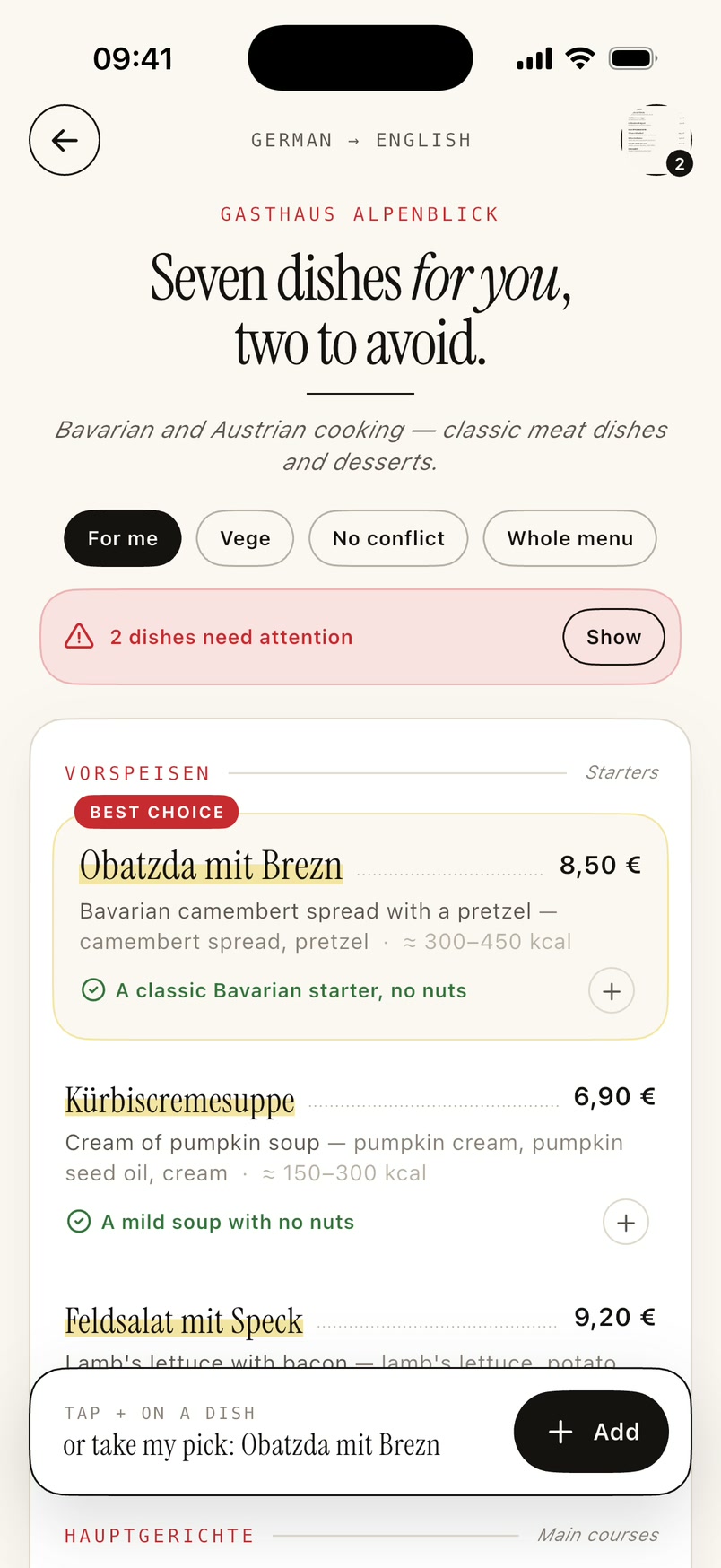
Four menu pages in a single scan.
An estimate on every dish.
How it works
Three moves at the table.
No typing dish names, no dictionary on your lap, no guessing.
-
Step 01
Photograph the menu
Camera or gallery. Up to four pages at once — still one scan from your pack.
-
Step 02
Read it your way
Names, ingredients, prices and calorie ranges in your language. Every dish gets a verdict: take it, fine, or skip.
-
Step 03
Say it to the waiter
A polite, natural sentence in the restaurant's language. The app reads it aloud and translates the waiter's answer by ear.
Try it dry
Tick what you can't eat.
This is part of a real menu from a Bavarian Gasthaus. Pick an allergen or a diet and the verdicts recalculate exactly as they do in the app. Everything runs in your browser.
What you get
Everything the menu keeps from you.
Privacy
Your allergies are health data. We treat them that way.
- Your name and avatar never leave the phone. The model only ever receives the allergen list and the diet — no name, no picture.
- We do not keep menu photos. A photo goes to the model only so it can be read. After the answer it is gone — we hold no copy, on a server or anywhere else.
- Your scan history is yours. Scans, favourites and the current order are files on your phone, not rows in our database.
- Telemetry without content. We know a scan succeeded and how many dishes it found. We do not know which.
- Delete your account with one tap. Profile → Narrator voice and settings → Delete account. The account, the counters and the plan go with it — no email required.
Pricing
Start for nothing.
Sign in with Apple or Google and every account gets a starter pack — enough for one dinner to find out whether this is for you.
Starter pack — free
- 2 menu scans (up to four pages each)
- 12 uses of the waiter phrasebook
- 5 playbacks with the better voice — the system voice is unlimited
As long as a holiday lasts. It renews every week — switch it off in your phone's Settings once you're home.
For someone who meets a foreign menu more than once a year.
The cheapest per month. Twelve months without thinking about limits.
Current prices are shown in the App Store — they depend on country and tax. Subscriptions renew automatically and you can cancel any time in your phone's Settings, without asking us.
Pro includes
- Scans, phrasebook and voice with no limit under normal use
- Better voices (OpenAI and ElevenLabs)
- History of 200 menus instead of 40
Questions
Before you ask.
Can I trust the allergen verdict?
The verdict is help, not a diagnosis. The app reads the menu — and a menu can be incomplete and knows nothing about what happens in the kitchen. That is why, for a dish carrying your allergen, MenuBuddy does not just flag it: it writes the sentence you use to ask the staff.
With a serious allergy, always confirm the ingredients with the waiter. MenuBuddy is not a medical device.
Do I need the internet?
For scanning, the phrasebook and the better voice — yes. Menus you already scanned, favourites and the sentences saved at the table work with no signal.
Why do I have to sign in?
The starter pack belongs to an account, not to a phone. Without sign-in there is no way to tell a new user from the same user who just reinstalled the app — and the model's bill is paid by the author. You sign in with Apple or Google, with no password and no new account to create.
How many pages can I send at once?
Four. The whole set counts as one scan from your pack, because from where you sit it is one menu.
Where do the calories come from?
They are the model's estimate for a typical portion, given as a range — not a nutrition label. Read it as “light or heavy”, not as data for counting macros.
Will there be an Android version?
Yes, it is planned. The app is written in Flutter, so the code is shared — what is left is the release and purchase verification on Google Play's side.
How do I cancel a subscription?
iPhone: Settings → your name → Subscriptions → MenuBuddy → Cancel. Cancelling runs to the end of the paid period. You do not need to tell us.
The next menu won't be a riddle.
MenuBuddy for iPhone. Coming soon to the App Store.